Human Activity Recognition Data Migration
Introducing the Human Activity Recognition Data Migration
1. Check raw data
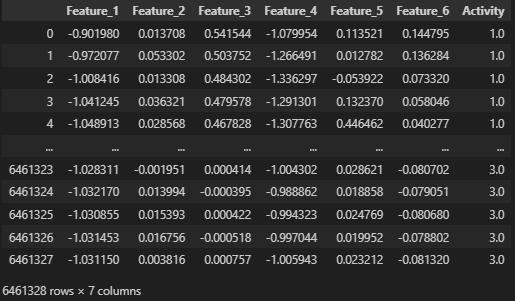
It seems that a new time column needs to be created, and preprocessing of the label 'Activity' is required.
2. Set the Preprocessing Plan
- Data Cleaning.
- Generate timestamps with a 1-minute interval.
- Convert label values.
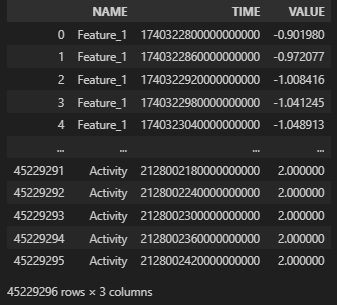
- Convert to the format: Name, Time, Value & Convert to UTC time.
Data Cleaning
- Generate timestamps with a 1-minute interval.
- Convert label values.
Convert to the format: Name, Time, Value & Convert to UTC time
Once the data frame is restructured as shown in the image below, it will be ready for upload to Machbase Neo.
3. Data Upload
machbase-neo shell import --input ./datahub-2025-4-human-activity.csv.gz --compress gzip --header --method append --timeformat ns activity
Check the entire code.
 machbase
4. Check the results after uploading

Output when executing the following code in the Machbase Neo internal shell.
select * from v$activity_stat;
※ Subsequent link to the AI training process: Human Activity Recognition Data
When accuracy matters for a costume, it is worth considering how details related to character costumes will affect the complete look. With practical wear in mind, it is sensible to balance details related to short cosplay wigs with care and storage needs. To review details related to cosplay costumes before the event, long cosplay wigs offers a useful starting point for practical preparation. To stay comfortable throughout the event, it is useful to check details related to men's cosplay costumes against the wearer's own needs.