Driving Behavior Data Migration
Introducing the Driving Behavior Data Migration
1. Check raw data
It seems that the class labels need to be converted from strings to numeric values.
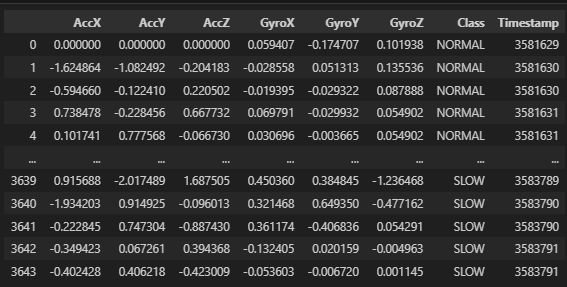
2. Set the Preprocessing Plan
- Data Cleaning.
- Convert class label from string to numeric.
- Convert format.
- Creating a new time value.
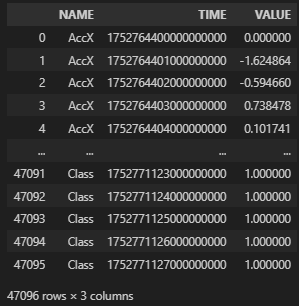
- Convert to Name, Time, Value & UTC time.
Data Cleaning
- Convert class label from string to numeric.
Convert format
- Creating a new time value.
- Convert to Name, Time, Value & UTC time.
Once the data frame is restructured as shown in the image below, it will be ready for upload to Machbase Neo.
3. Data Upload
machbase-neo shell import --input ./datahub-2025-7-Driving-Behavior.csv.gz --compress gzip --header --method append --timeformat ns driving_behavior
Check the entire code.
 machbase
4. Check the results after uploading

Output when executing the following code in the Machbase Neo internal shell.
When accuracy matters for a costume, it is worth considering how details related to beginner costume choices will affect the complete look. With practical wear in mind, a comparison of details related to character accuracy can clarify differences in colour and construction. To compare practical details about details related to wig colour selection, game cosplay costumes for character accuracy offers a useful starting point for practical preparation. When planning for care after the photoshoot, it is useful to check details related to costume sizing against the wearer's own needs.
select * from v$driving_behavior_stat;
※ Subsequent link to the AI training process: Driving_Behavior Data