data_load
Description
This API performs the function of outputting the Tag Table of the specified parameter.
When planning a cosplay look, it is worth considering how details related to men's cosplay costumes will affect the complete look. As fans study the source material, it helps to assess details related to women's cosplay costumes together with fit and fabric. For combinations connected with details related to beginner costume choices, Genshin Impact cosplay costumes for photoshoots offers a useful starting point for practical preparation. For an outfit that feels convincing, it is useful to check details related to character accuracy against the wearer's own needs.
API module path
from api.v2.util.data_load import data_load
Parameters
URL
- Specifies the URL address where the Mahabase Neo DB is installed.
- Example
- URL = 'http://127.0.0.1:5654' (Local)
Table
- Specifies the name of the table that contains the data. Only a single table can be specified.
- Example
- table=home (O)
- table=home.rotor (X)
name
- Specify the Tag Name to load.
- Set the required Tag Names after the EDA process.
start_time
- Specify the start time of the data to be loaded.
- Example
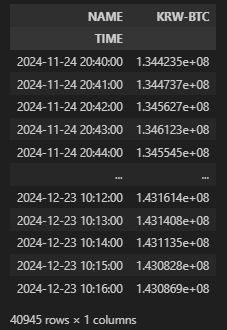
- start_time = '2024-11-24 20:00:00'
end_time
- Specify the end time of the data to be loaded.
- Example
- end_time = '2024-12-31 00:00:00'
Timeformat
- specifies the time format.
- The time format follows the KST (Korean Standard Time) notation.
- Option
- 'default'
- Use the system's default time format.
- '2006-01-02 15:04:05.000000'
- The time format of the system's default time format that includes nanoseconds.
- 'default'
- Example
- Timeformat = 'default'
- Timeformat = quote('2006-01-02 15:04:05.000000')
Resample_freq
- Specifies the resampling unit.
- By default, the calculation is done using the mean.
- Option
- 'S'
- Second
- 'T'
- Minute
- 'H'
- Hour
- 'D'
- Day
- 'W'
- Week
- 'M'
- Month
- 'Q'
- Quarter
- 'Y'
- Year
- 'S'
- Example
- Resample_freq = '10T'
- Resampling at 10-minute intervals.
- Resample_freq = '10T'
Example Sample Code (Python)
Results
Check the entire module code.
datahub/api/v2/util/data_load.py at main · machbase/datahub
All Industrial IoT DataHub with data visualization and AI source - machbase/datahub
 machbase